
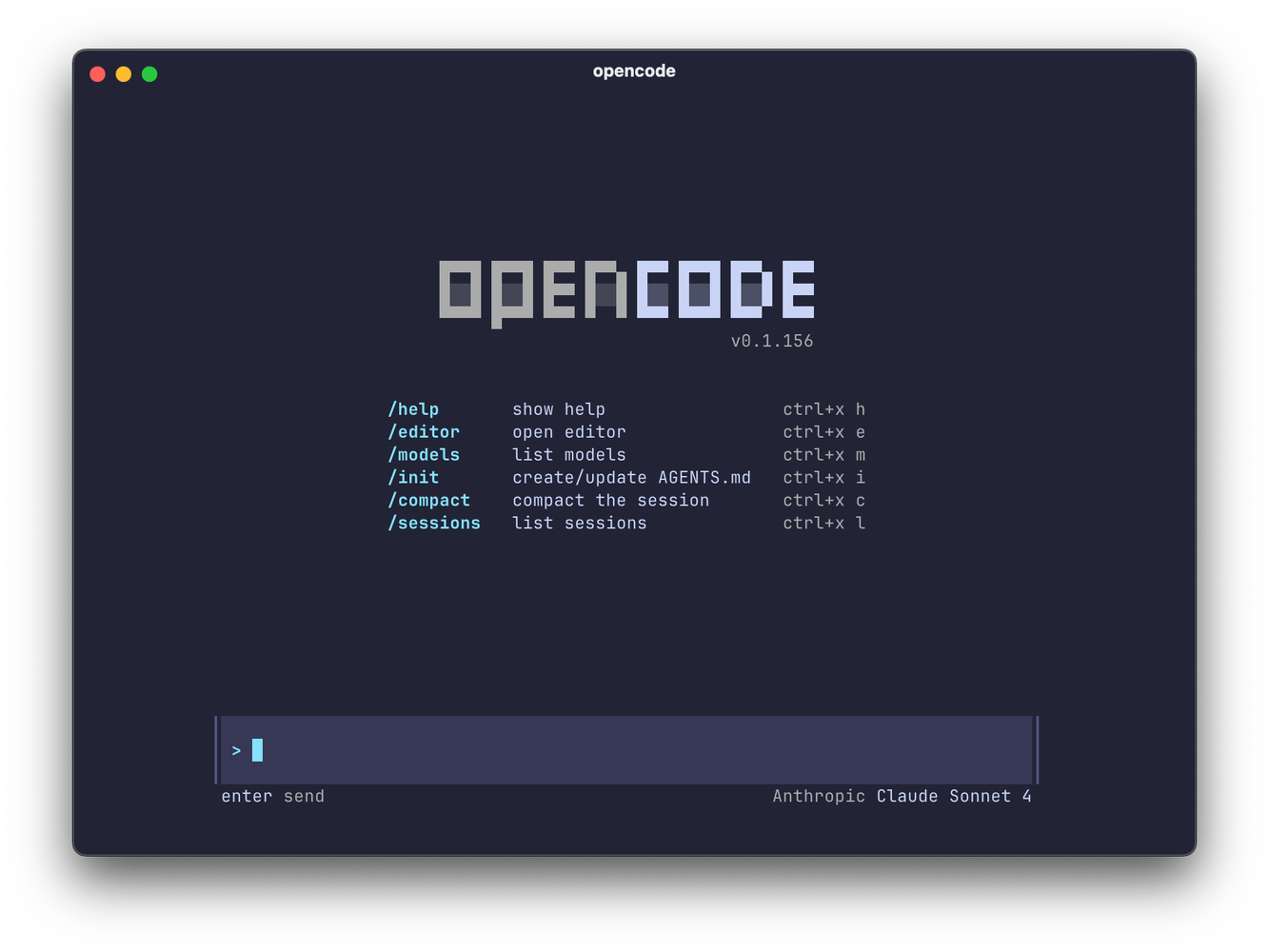
Here we are gonna talk about the complete setup guide step by step of OpenCode at your terminal CLI for Windows, Linux and Mac.
If you are not familiar with basic setups than please first go to BASIC GUIDE to understand the concept overall.
i will guide you well but in any case you have confusion, you can visit my Discussion Page.
Quick Navigation
Why OpenCode?
Key advantages:
- ✅ Open source – Community-driven development
- ✅ Multiple providers – Claude, OpenAI, Grok, Gemini, local models
- ✅ Grok free tier – Free usage with X/Twitter integration
- ✅ Local models – Run Ollama models completely offline
- ✅ Claude Pro login – Use existing subscription (like Claude Code)
- ✅ Session sharing – Share your AI sessions with others
- ✅ Timeline feature – Time-travel through conversations
Best for:
- Experimentation with different models
- Local/offline AI usage
- Cost optimization (mix free + paid)
- Open-source preference
Installation
Quick Install (Recommended)
Manual Install (npm)
First Launch
First time experience:
- Launches with Grok Fast model by default (FREE!)
- Beautiful TUI interface
- Reads current directory automatically
The Interface
┌─ opencode ──────────────────────────────────────────┐
│                                                      │
│  🚀 Welcome to opencode                              │
│  Model: grok-fast-1                                  │
│                                                      │
│  > Your prompt here                                  │
│                                                      │
└──────────────────────────────────────────────────────┘
Free Tier: Grok Integration
What is Grok?
- X/Twitter’s AI model
- Free tier available through opencode partnership
- Fast inference
- Good for general tasks
Using Grok (Default)
Already on Grok Fast by default!
> Help me plan a homelab project
No API key needed! Partnership with X provides free access.
Model Management
View Available Models
# In opencode session
> /model
Shows:
Available Models:
- grok-fast-1 (FREE - current)
- claude-sonnet-4
- claude-opus-4
- gpt-4
- gemini-2.5-pro
- llama-3.2 (local via Ollama)
Switch Models
> /model
# Select from list

# Or specify directly
> /model claude-sonnet-4
> /model grok-fast-1
> /model llama-3.2
Switching:
> /model claude-sonnet-4
# "Cool, what's our next step?"

> /model grok-fast-1
# "While it's doing that, I can do /sessions"
Model Switching Mid-Conversation
The power move:
# Start with Claude for deep thinking
> /model claude-sonnet-4
> Create a comprehensive system architecture

# Switch to Grok for quick follow-up
> /model grok-fast-1
> Summarize that in bullet points
Provider Authentication
Login with Claude Pro
Select: “Anthropic”
Browser opens:
- Login with Claude Pro account
- Copy authorization code
- Paste in terminal
Now you have access to:
- Claude Sonnet 4.5
- Claude Opus 4
- Uses your existing subscription!
Other Providers
OpenAI (ChatGPT):
opencode auth login
# Select: OpenAI
# Enter API key
Google (Gemini):
opencode auth login
# Select: Google
# Authenticate with Google account
Check Auth Status
opencode auth whoami
Local Models with Ollama
Prerequisites
Install Ollama first:
# macOS
brew install ollama

# Linux
curl -fsSL https://ollama.com/install.sh | sh

# Windows (WSL)
curl -fsSL https://ollama.com/install.sh | sh
Pull a Model
Technologia uses Llama 3.2:
ollama pull llama-3.2
Check available models:
ollama list
Configure opencode for Local Models
Edit config:
nano ~/.config/opencode/opencode.jsonc
Add model configuration:
{
  "model": "llama-3.2",
  "provider": "ollama"
}
Save and exit
Use Local Model
opencode
# Loads with llama-3.2

# Or switch in session
> /model llama-3.2
Benefits:
- ✅ Completely offline
- ✅ No API costs
- ✅ Privacy (data never leaves machine)
- ✅ Great for sensitive work
Advanced Features
Session Sharing
Share your conversation:
Returns: URL copied to clipboard
Paste in browser:
https://opencode.net/session/abc123...
“I can share my session with people. That’s pretty neat.”
“Wait, is it live? Oh, you can share your session with people!”
Session Timeline
Time-travel through conversation:
> /timeline
Shows:
Session Timeline:
├─ 10:23 - Started session
├─ 10:25 - Asked about homelab setup
├─ 10:28 - Created plan document
├─ 10:30 - Switched to Llama 3.2
└─ 10:32 - Generated cost analysis
Select any point to restore:
# Click on timestamp
# Session rewinds to that point
“We can jump back in time and restore. I want that in real life!”
Session Management
View all sessions:
> /sessions
Shows:
Recent Sessions:
1. homelab-planning (active)
2. blog-writing (1 hour ago)
3. research-project (yesterday)
Switch sessions:
# Select from list
# Or start new:
> /sessions
# Choose "New session"
Headless Mode
Run opencode without TUI:
opencode --headless "Write a blog intro about ZFS"
Output goes directly to stdout
Export Session
opencode --export-session session-id
Exports as JSON data
Context Files: agents.md
Initialize Context
> /init
Creates: agents.md (not agent.md or opencode.md)
Why “agents.md”?
- opencode follows proposed standard
- Claude Code’s Codex uses agents.md
- Trying to standardize across tools
Sync with Other Tools
When using opencode + Claude + Gemini:
# Use Claude to sync all three
claude
> Sync claude.md content to gemini.md and agents.md
Chuck’s workflow:
“They’re trying to make it a standard. They’re all the same.”
Feature Showcase
1. Agents Support
opencode agents create my-agent
Similar to Claude Code agents
2. Headless Server
opencode server start
Then attach from another terminal:
opencode server attach
3. Session Export
opencode export --format json > session.json
4. Rich Formatting
- Markdown rendering
- Code syntax highlighting
- Table support
Real-World Usage
Cost Optimization Strategy
Mix free and paid models:
# Free: Grok for research
> /model grok-fast-1
> Research top 5 NAS options

# Paid: Claude for writing
> /model claude-sonnet-4
> Write a comprehensive buying guide based on research

# Free: Local for experimentation
> /model llama-3.2
> Generate 5 alternative titles
Privacy-First Workflow
Sensitive work uses local models:
# Switch to local
> /model llama-3.2

# Work on sensitive documents
> Review this confidential file...

# No data sent to cloud ✓
Model Comparison
Get multiple perspectives:
# Ask Claude
> /model claude-sonnet-4
> What's the best homelab storage solution?

# Save Claude's answer, then ask Grok
> /model grok-fast-1
> What's the best homelab storage solution?

# Compare responses
Chuck’s Real Usage
cd ~/Projects/531-ai-terminal
opencode

# It loads agents.md automatically
> Where are we in the project?

# Grok responds with project status
Then switches models:
> /model claude-sonnet-4
> Continue working on the script
All in one session, same context!
Configuration
Config File Location
~/.config/opencode/opencode.jsonc
Example Configuration
{
  "model": "claude-sonnet-4",
  "provider": "anthropic",
  "theme": "dark",
  "thinking": true,
  "temperature": 0.7,
  "maxTokens": 4096
}
Edit Config
nano ~/.config/opencode/opencode.jsonc
Command Reference
In-Session Commands
/model              # Change model
/share              # Share session
/timeline           # View timeline
/sessions           # Manage sessions
/init               # Create agents.md
/help               # Show help
exit                # Exit opencode
CLI Commands
opencode                    # Launch
opencode auth login         # Authenticate provider
opencode auth whoami        # Check auth status
opencode --version          # Version info
opencode --headless "..."   # Headless mode
opencode --help             # Help
Troubleshooting
“Command not found: opencode”
# Reload shell
source ~/.bashrc
source ~/.zshrc

# Or reinstall
curl -fsSL https://opencode.sh/install.sh | sh
Local Model Not Working
# Verify Ollama is running
ollama list

# Pull model if missing
ollama pull llama-3.2

# Check config
cat ~/.config/opencode/opencode.jsonc
Authentication Issues
# Re-authenticate
opencode auth login

# Check status
opencode auth whoami

# Clear auth and retry
rm -rf ~/.config/opencode/auth
opencode auth login
Context File Not Loading
# Verify file exists
ls agents.md

# Recreate
> /init
Comparison: opencode vs Others
| Feature | opencode | Claude Code | Gemini CLI |
|---|---|---|---|
| Cost | Free (Grok) | $20/mo | Free |
| Local Models | ✅ Yes | ❌ No | ❌ No |
| Multiple Providers | ✅ Yes | ❌ Claude only | ❌ Gemini only |
| Session Sharing | ✅ Yes | ❌ No | ❌ No |
| Timeline Feature | ✅ Yes | ❌ No | ❌ No |
| Agents | ✅ Yes | ✅ Yes | ❌ No |
| Open Source | ✅ Yes | ❌ No | ❌ No |
“It might be the best tool of all of them. I’m still testing it.”
When to Use opencode
✅ Choose opencode for:
- Experimentation with different models
- Cost optimization (mix free/paid)
- Privacy needs (local models)
- Open-source preference
- Model comparison workflows
- Session sharing needs
❌ Choose Claude Code instead for:
- Production workflows (more mature)
- Complex agent setups
- Output styles
- Planning mode
❌ Choose Gemini CLI instead for:
- Simplest setup
- Pure Google ecosystem
- Getting started (easiest learning curve)
The Developers
From Technologia mention:
“What’s fun is I’ve been following these guys on Twitter before they started making this code. This guy Dax, these guys are killing it.”
GitHub: stackblitz-labs/opencode
Community: Active development, responsive maintainers
Future Potential
Why Chuck is excited:
- Open source → Community contributions
- Multi-provider → Use best model for each task
- Local models → Privacy + cost control
- Standards push → agents.md adoption
- Feature velocity → Rapid development
“If a new, greater, better AI comes out, I’m ready for it.”
opencode enables this with provider flexibility.
What’s Next?
Get started with opencode:
- Install it (2 minutes)
- Try Grok free tier (no auth needed)
- Experiment with model switching
- Try local models if privacy-conscious
- Use for cost-optimized workflows
Explore:
➡️ Gemini Complete Guide
➡️ Cloude Code Complete Guide
➡️ DeepSeek Complete Guide
➡️ ChatGPT Complete Guide



2 Comments